• Initiateur de la discussion Initiateur de la discussion maval
  • Date de début Date de début

Boostez vos compétences Excel avec notre communauté !

Rejoignez Excel Downloads, le rendez-vous des passionnés où l'entraide fait la force. Apprenez, échangez, progressez – et tout ça gratuitement ! 👉 Inscrivez-vous maintenant !

maval

XLDnaute Barbatruc
Bonjour,

J'ai un userform avec une combobox et a l'aide de bouton Option j'ai le choix de voir la colonne "A ou B".
J'aimerai que dans la combobox la liste se fasse par ordre alpha sans toucher aux colonne.

Je joint mon fichier

Je vous remercie d'avance
 

Pièces jointes

Re : Trie Combobox

Bonjour,

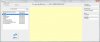
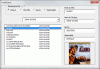
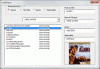
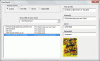
Le programme d'origine est faux (voir copie écran ci dessous)

Sans titre.jpg

http://boisgontierjacques.free.fr/fichiers/Formulaire/FormCascadeDVD.xls

Sans titre.gif

JB
 

Pièces jointes

  • Sans titre.jpg
    Sans titre.jpg
    27.8 KB · Affichages: 48
  • Sans titre.jpg
    Sans titre.jpg
    27.8 KB · Affichages: 46
  • Sans titre.gif
    Sans titre.gif
    63 KB · Affichages: 36
  • Sans titre.gif
    Sans titre.gif
    63 KB · Affichages: 36
Dernière édition:
Re : Trie Combobox

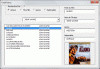
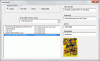
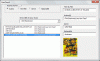
Version avec:
-Plusieurs acteurs pour un film
-Recherche intuitive dans le ComboBox (premières lettres ou lettres contenues)

On peut frapper Eas pour Clint Eastwood ou Dollar pour Et pour Quelques Dollars

http://boisgontierjacques.free.fr/fichiers/Formulaire/FormCascadeDVD.xls

Code:
Dim f, titre, col, choix1()
Option Compare Text
Private Sub UserForm_Initialize()
  Set f = Sheets("Liste")
  Me.OptionButton1 = True
  titre = "Acteur": AlimComboBox
End Sub

Private Sub OptionButton1_Click()
  titre = "Acteur": AlimComboBox
End Sub

Private Sub OptionButton2_Click()
  titre = "Titre de film": AlimComboBox
End Sub

Sub AlimComboBox()
  col = Application.Match(titre, f.[A1:E1], 0)
  If IsError(col) Then Exit Sub
  Set mondico = CreateObject("Scripting.Dictionary")
  mondico.CompareMode = vbTextCompare
  a = Application.Transpose(f.Cells(2, col).Resize(f.Cells(65000, col).End(xlUp).Row).Value)
  For i = LBound(a) To UBound(a)
    If a(i) <> "" Then
       b = Split(a(i), ",")
       For j = LBound(b) To UBound(b)
         mondico(b(j)) = ""
       Next j
    End If
  Next i
  choix1 = mondico.keys
  Call Tri(choix1, LBound(choix1), UBound(choix1))
  Me.ComboBox1.ListIndex = -1
  Me.ComboBox1.List = choix1
  Me.ComboBox1.SetFocus
End Sub

Private Sub combobox1_Change()
  If Me.ComboBox1.ListIndex = -1 And IsError(Application.Match(Me.ComboBox1, choix1, 0)) Then
   Me.ComboBox1.List = Filter(choix1, Me.ComboBox1.Text, True, vbTextCompare)
   Me.ComboBox1.DropDown
  Else
    ComboBox1_click
  End If
End Sub

Private Sub ComboBox1_DblClick(ByVal Cancel As MSForms.ReturnBoolean)
  AlimComboBox
End Sub

Private Sub ComboBox1_click()
   bd = Range("A2:E" & [A65000].End(xlUp).Row)
   c = Application.Match(titre, f.[A1:E1], 0)
   Me.ListBox1.Clear
   j = 0
   For i = LBound(bd) To UBound(bd)
     If InStr(bd(i, c), Me.ComboBox1) > 0 Then
        Me.ListBox1.AddItem bd(i, 1)
        Me.ListBox1.List(j, 1) = bd(i, 2)
        Me.ListBox1.List(j, 2) = bd(i, 3)
        Me.ListBox1.List(j, 3) = bd(i, 4)
        j = j + 1
     End If
   Next i
End Sub

Private Sub ListBox1_Click()
 Me.TextBox1 = Me.ListBox1
 Me.TextBox2 = Me.ListBox1.Column(1)
 Me.TextBox3 = Me.ListBox1.Column(2)
 Me.TextBox4 = Me.ListBox1.Column(3)
 nom = Me.ListBox1
 répertoire = "c:\photos\"
 If Dir(répertoire & nom & ".jpg") <> "" Then
  Me.Image1.Picture = LoadPicture(répertoire & nom & ".jpg")
 Else
  Me.Image1.Picture = LoadPicture
 End If 
End Sub

Sans titre.gif

JB
 

Pièces jointes

  • FormCascadeDVD2.xls
    FormCascadeDVD2.xls
    126 KB · Affichages: 38
  • Sans titre.gif
    Sans titre.gif
    70 KB · Affichages: 29
  • Sans titre.gif
    Sans titre.gif
    70 KB · Affichages: 27
Dernière édition:
Re : Trie Combobox

Bonjour JB,

J'ai un petit souci j'ai ajouté 9 textbox en modifiant bien sur [B3:N3]au delà de 9 TextBox total j'ai un message d'erreur
"Erreur d'exécution 380 impossible de lire la propriété list. valeur de propriété non valide "
Je pense que sa doit être un simple modif?

Merci d'avance et bonne journée
 
Re : Trie Combobox

Bonjour JB,

J'ai un petit souci j'ai ajouté 9 textbox en modifiant bien sur [B3:N3]au delà de 9 TextBox total j'ai un message d'erreur
Code:
"Erreur d'exécution 380 impossible de lire la propriété list. valeur de propriété non valide "
Je pense que sa doit être un simple modif?

Merci d'avance et bonne journée
 
Re : Trie Combobox

Voir PJ

Au delà de 10 colonnes, AddItem ne fonctionne plus. Il faut alimenter le ListBox par un tableau.

Code:
Dim f, titre, col, choix1()
Option Compare Text
Private Sub UserForm_Initialize()
  Set f = Sheets("Liste")
  Me.OptionButton1 = True
  titre = "Acteur": AlimComboBox
End Sub

Private Sub OptionButton1_Click()
  titre = "Acteur": AlimComboBox
End Sub

Private Sub OptionButton2_Click()
  titre = "Titre de film": AlimComboBox
End Sub

Private Sub OptionButton3_Click()
  titre = "Genre": AlimComboBox
End Sub

Private Sub OptionButton4_Click()
  titre = "Nationalite": AlimComboBox
End Sub

Sub AlimComboBox()
  col = Application.Match(titre, f.[B3:N3], 0) + 1
  If IsError(col) Then Exit Sub
  Set mondico = CreateObject("Scripting.Dictionary")
  mondico.CompareMode = vbTextCompare
  a = Application.Transpose(f.Cells(4, col).Resize(f.Cells(65000, col).End(xlUp).Row).Value)
  For i = LBound(a) To UBound(a)
    If a(i) <> "" Then
       b = Split(a(i), ",")
       For j = LBound(b) To UBound(b)
         mondico(b(j)) = ""
       Next j
    End If
  Next i
  choix1 = mondico.keys
  Call Tri(choix1, LBound(choix1), UBound(choix1))
  Me.ComboBox1.ListIndex = -1
  Me.ComboBox1.List = choix1
  Me.ComboBox1.SetFocus
End Sub

Private Sub combobox1_Change()
  If Me.ComboBox1.ListIndex = -1 And IsError(Application.Match(Me.ComboBox1, choix1, 0)) Then
   Me.ComboBox1.List = Filter(choix1, Me.ComboBox1.Text, True, vbTextCompare)
   Me.ComboBox1.DropDown
  Else
   ComboBox1_click
  End If
End Sub

Private Sub ComboBox1_click()
   bd = Range("B4:N" & [B65000].End(xlUp).Row)
   c = Application.Match(titre, f.[B3:N3], 0)
   Me.ListBox1.Clear
   j = 0
   Dim b()
   For i = LBound(bd) To UBound(bd)
     If InStr(bd(i, c), Me.ComboBox1) > 0 Then
         j = j + 1: ReDim Preserve b(1 To 13, 1 To j)
         For k = 1 To 13: b(k, j) = bd(i, k): Next k
     End If
   Next i
   If j > 0 Then
      If UBound(b, 2) > 1 Then
          Me.ListBox1.List = Application.Transpose(b)
      Else
          Dim tmp(1 To 1, 1 To 13)
          For k = 1 To 13: tmp(1, k) = b(k, 1): Next k
          Me.ListBox1.List = tmp
      End If
   End If
End Sub

Private Sub ComboBox1_DblClick(ByVal Cancel As MSForms.ReturnBoolean)
  AlimComboBox
End Sub

Private Sub ListBox1_Click()
 For k = 1 To 13
   Me("textbox" & k) = Me.ListBox1.Column(k - 1)
 Next k
 nom = Me.ListBox1
 répertoire = "C:\Users\Max\Desktop\photos\"
 If Dir(répertoire & nom & ".jpg") <> "" Then
  Me.Image1.Picture = LoadPicture(répertoire & nom & ".jpg")
 Else
  Me.Image1.Picture = LoadPicture
 End If
 
End Sub

JB
 

Pièces jointes

Dernière édition:
- Navigue sans publicité
- Accède à Cléa, notre assistante IA experte Excel... et pas que...
- Profite de fonctionnalités exclusives
Ton soutien permet à Excel Downloads de rester 100% gratuit et de continuer à rassembler les passionnés d'Excel.
Je deviens Supporter XLD

Discussions similaires

Réponses
37
Affichages
949
Réponses
40
Affichages
2 K
  • Question Question
XL 2016 liste
Réponses
10
Affichages
332
  • Question Question
Microsoft 365 Aide planning
Réponses
17
Affichages
531
Réponses
15
Affichages
847
  • Question Question
Microsoft 365 agrandir la liste
Réponses
21
Affichages
418
Réponses
8
Affichages
357
Retour