[Resolu par Papou-net] Normal ou reduit Userform

  • Initiateur de la discussion Initiateur de la discussion Bearn 64
  • Date de début Date de début

Boostez vos compétences Excel avec notre communauté !

Rejoignez Excel Downloads, le rendez-vous des passionnés où l'entraide fait la force. Apprenez, échangez, progressez – et tout ça gratuitement ! 👉 Inscrivez-vous maintenant !

Bearn 64

XLDnaute Occasionnel
Bonjour le Forum,

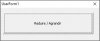
Une information est-il possible de réduire un userform a la taille d'un bouton. et de l'agrandir avec le même bouton.

Le bouton doit être de quelle nature command ou toggle ?????


Merci a tous de votre aide.
 

Pièces jointes

  • userform_normal.jpg
    userform_normal.jpg
    13.5 KB · Affichages: 42
  • userform_reduit.jpg
    userform_reduit.jpg
    18.5 KB · Affichages: 41
Dernière édition:
Re : Normal ou reduit Userform

Bonjour Papou-net, le Forum.

je voudrais avoir le userform pleins écran.


Code:
Dim i As Byte, CBg As Integer, CBh As Integer, Lib
Dim UFl As Integer, UFh As Integer

Private Sub CommandButton1_Click()

Select Case i
  Case 0 'Réduire
    i = 1
    CommandButton1.Left = 2
    CommandButton1.Top = 2
    CommandButton1.Caption = Lib(1)
    Me.Width = 4 + CommandButton1.Width
    Me.Height = 28 + CommandButton1.Height
  Case 1 'Agrandir
    i = 0
    CommandButton1.Left = CBg
    CommandButton1.Top = CBh
    CommandButton1.Caption = Lib(0)
    Me.Width = UFl
    Me.Height = UFh

End Select


End Sub

Private Sub CommandButton9_Click()

UsfCommande.Show 0

End Sub

Private Sub UserForm_Initialize()
Lib = Array("Réduire", "Agrandir")
i = 0
UFl = Me.Width: UFh = Me.Height
CBg = CommandButton1.Left: CBh = CommandButton1.Top
CommandButton1.Caption = Lib(i)


With Me
.StartUpPosition = 1
.Width = Application.Width
.Height = Application.Height
.Left = 0
.Top = 0
End With


End Sub

A l'ouverture OK pleins écran.
Réduire et Agrandir le userform ne revient pas en pleins écran.

Merci de votre aide.

Bearn 64
 
Re : [Resolu par Papou-net] Normal ou reduit Userform

Bonjour Bearn 64,

Il faut définir le mode plein écran dans l'initialisation du formulaire.

Code:
Private Sub UserForm_Initialize()
Lib = Array("Réduire", "Agrandir")
i = 0
With Me
  .Width = Application.Width - 10:  .Height = Application.Height - 10
  UFl = .Width: UFh = .Height
  CommandButton1.Left = .Width - CommandButton1.Width - 10
  CommandButton1.Top = .Height - CommandButton1.Height - 25
End With
CBg = CommandButton1.Left: CBh = CommandButton1.Top
CommandButton1.Caption = Lib(i)
End Sub
Bon dimanche dans le beau Béarn que j'apprécie.

Cordialement.
 

Pièces jointes

- Navigue sans publicité
- Accède à Cléa, notre assistante IA experte Excel... et pas que...
- Profite de fonctionnalités exclusives
Ton soutien permet à Excel Downloads de rester 100% gratuit et de continuer à rassembler les passionnés d'Excel.
Je deviens Supporter XLD

Discussions similaires

  • Question Question
XL 2019 User Form
Réponses
9
Affichages
466
  • Question Question
Microsoft 365 affichage userform
Réponses
4
Affichages
497
Réponses
3
Affichages
854
Réponses
14
Affichages
710
Retour