• Initiateur de la discussion Initiateur de la discussion mathieu27
  • Date de début Date de début

Boostez vos compétences Excel avec notre communauté !

Rejoignez Excel Downloads, le rendez-vous des passionnés où l'entraide fait la force. Apprenez, échangez, progressez – et tout ça gratuitement ! 👉 Inscrivez-vous maintenant !

M

mathieu27

Guest
bonjour le forum
j'ai vraiment besion de votre aide sur ce coup la je doit rendre mon projet demain a mon responsable.

voila je me confronte a un probleme de taille j'ai un fichier (ci-joint)
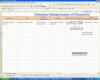
sur lesquel je rempli des textbox ,combox et dtpiker qui sont renvoyer sur deux fiches la fiche agent et la fiche synthèse.Le probleme ce pose sur la fiche syntese quand je creer une fiche avec un cdi puis en deuxieme temps un cdd la donnée du cdd n'est plus sur la meme ligne .


merci de votre aide

http://cjoint.com/?eDkxKptn0D
 

Pièces jointes
  • explication.jpg
    explication.jpg
    52.1 KB · Affichages: 49
  • explication.jpg
    explication.jpg
    52.1 KB · Affichages: 51
  • explication.jpg
    explication.jpg
    52.1 KB · Affichages: 49
Dernière modification par un modérateur:
Re : au secour !!!!!

Bonjour, et malgrès le au secour
Il n'y a pas que ca qui doit deconner.
Pour le principe:
quand tu calcul le numéro de ligne par la formule
lig = Sheets("synthèse").Range("A65536").End(xlUp).Row + 1
Tu doit toujours le faire à partir de la colonne ou il existe obligatoirement quelque chose dans ce cas ca doit être la colonne a (nom)
Dans ton PG tu calcul pour chaque colonne. largement inutile et faux
Calcul lig une première fois au début et utilise le ensuite pour tous les box

Bonne chance
 
Re : au secour !!!!!

essaie cela
Private Sub CommandButton3_Click()
'Fiche agent
lig = Sheets("synthèse").Range("A65536").End(xlUp).Row + 1

Sheets("Fiche Agent").Range("B5") = TextBox2 'nom
Sheets("synthèse").Range("A" & lig) = UserForm1.TextBox2

Sheets("Fiche Agent").Range("B6") = TextBox3 'prenom
Sheets("synthèse").Range("b" & lig) = UserForm1.TextBox3

Sheets("Fiche Agent").Range("B8") = TextBox4 'tel
Sheets("synthèse").Range("c" & lig) = UserForm1.TextBox4

Sheets("Fiche Agent").Range("B9") = TextBox5 'fax
Sheets("synthèse").Range("d" & lig) = UserForm1.TextBox5

Sheets("Fiche Agent").Range("B10") = TextBox6 'portable
Sheets("synthèse").Range("E" & lig) = UserForm1.TextBox6

Sheets("Fiche Agent").Range("B12") = TextBox7 'mail

Sheets("Fiche Agent").Range("h5") = TextBox8 'bureau

Sheets("synthèse").Range("F" & lig) = UserForm1.TextBox8

Sheets("Fiche Agent").Range("h7") = ComboBox1 'service

Sheets("synthèse").Range("G" & lig) = UserForm1.ComboBox1

Sheets("Fiche Agent").Range("h8") = ComboBox2 'pole
Sheets("synthèse").Range("H" & lig) = UserForm1.ComboBox2

Sheets("Fiche Agent").Range("h9") = ComboBox3 'responsable
Sheets("synthèse").Range("I" & lig) = UserForm1.ComboBox3

Sheets("Fiche Agent").Range("h10") = TextBox9 'fonction
Sheets("synthèse").Range("J" & lig) = UserForm1.TextBox9

Sheets("Fiche Agent").Range("h12") = TextBox10 'temps
Sheets("synthèse").Range("K" & lig) = UserForm1.TextBox10

Sheets("Fiche Agent").Range("h13") = TextBox11 'jours
Sheets("synthèse").Range("L" & lig) = UserForm1.TextBox11

'type contrat
'cdi
Sheets("Fiche Agent").Range("b19") = DTPicker1 'depuis le
lig = Sheets("synthèse").Range("S65536").End(xlUp).Row + 1 'Depuis le
Sheets("synthèse").Range("S" & lig) = UserForm1.DTPicker1
Sheets("Fiche Agent").Range("b20") = ComboBox4 'contrat
Sheets("Fiche Agent").Range("b21") = TextBox13 'date d'option
Sheets("Fiche Agent").Range("b22") = TextBox14 'échelon
Sheets("Fiche Agent").Range("b23") = TextBox19 'niveau
Sheets("Fiche Agent").Range("b24") = TextBox22 'indice
Sheets("Fiche Agent").Range("b25") = TextBox21 'coeficient
'CDD
Sheets("Fiche Agent").Range("h19") = DTPicker2 'debut1
Sheets("synthèse").Range("M" & lig) = UserForm1.DTPicker2

Sheets("Fiche Agent").Range("h20") = DTPicker3 'fin1
Sheets("synthèse").Range("N" & lig) = UserForm1.DTPicker3

Sheets("Fiche Agent").Range("h22") = DTPicker4 'debut2
Sheets("synthèse").Range("O" & lig) = UserForm1.DTPicker4

Sheets("Fiche Agent").Range("h23") = DTPicker5 'fin2
Sheets("synthèse").Range("P" & lig) = UserForm1.DTPicker5

Sheets("Fiche Agent").Range("h25") = DTPicker6 'debut3
Sheets("synthèse").Range("Q" & lig) = UserForm1.DTPicker6

Sheets("Fiche Agent").Range("h26") = DTPicker7 'fin3
Sheets("synthèse").Range("R" & lig) = UserForm1.DTPicker7
 
Re : au secour !!!!!

merci sousou de ta reponse .

mais je ne travail en vba que depuis 6 mois et je ne comprend pas tout encore
la ligne dont tu parle ma été donné par youky(BJ) sur le forum
https://www.excel-downloads.com/threads/prise-de-tete.140817/
si tu peux me donné plus de detail ce serait super .
il n'y as pas moyen de dire par exemple que si cdi est rempli ont met un "." dans cdd et vice versa?

merci de ton aide.
 
- Navigue sans publicité
- Accède à Cléa, notre assistante IA experte Excel... et pas que...
- Profite de fonctionnalités exclusives
Ton soutien permet à Excel Downloads de rester 100% gratuit et de continuer à rassembler les passionnés d'Excel.
Je deviens Supporter XLD
Assurez vous de marquer un message comme solution pour une meilleure transparence.

Discussions similaires

A
Réponses
3
Affichages
1 K
alouette30
A
G
Réponses
3
Affichages
1 K
Gabasin
G
F
Réponses
12
Affichages
1 K
Fariri
F
M
  • Question Question
Réponses
4
Affichages
2 K
F
Réponses
17
Affichages
2 K
Fariri
F
G
Réponses
16
Affichages
5 K
G
O
Réponses
1
Affichages
1 K
N
Réponses
15
Affichages
3 K
M
Réponses
2
Affichages
13 K
Mister.salm
M
Retour