XL 2019 Insérer un commentaire prêt à saisir de B à X sans limite... (excepté en ligne 1 ; taille de commentaire Ok déjà voir code VB en B*)

Boostez vos compétences Excel avec notre communauté !

Rejoignez Excel Downloads, le rendez-vous des passionnés où l'entraide fait la force. Apprenez, échangez, progressez – et tout ça gratuitement ! 👉 Inscrivez-vous maintenant !

anthoYS

XLDnaute Barbatruc
Bonjour


*Sauf qu'il faudrait retirer ces commentaires
"petit déj :


déj :


snack/collation :


diner : "

le commentaire doit être vierge mais prêt à saisir !


VB:
Private Sub Worksheet_BeforeRightClick(ByVal Target As Range, Cancel As Boolean)
    If Target.Column = 2 Then ' Vérifie si le clic droit est dans la colonne B
        Cancel = True ' Annule le menu contextuel par défaut
        Application.DisplayCommentIndicator = xlCommentIndicatorOnly
        ' Crée ou ouvre une nouvelle note avec du texte présaisi, espacé, en gras et souligné
        If Target.Comment Is Nothing Then
            With Target
                .AddComment ""
                With .Comment.Shape.TextFrame.Characters
                    .Text = "petit déj : " & vbNewLine & vbNewLine & "déj : " & vbNewLine & vbNewLine & "snack/collation : " & vbNewLine & vbNewLine & "diner : "
                    .Font.Bold = True
                    .Font.Underline = True
                End With
                ' Agrandit la fenêtre du commentaire
                .Comment.Shape.Width = 200 ' Largeur en points
                .Comment.Shape.Height = 150 ' Hauteur en points
                .Comment.Visible = True
                .Comment.Shape.Select
            End With
        Else
            Target.Comment.Visible = True
            Target.Comment.Shape.Select
        End If
    ElseIf Target.Column = 10 Then ' Vérifie si le clic droit est dans la colonne J
        Cancel = True ' Annule le menu contextuel par défaut
        Application.DisplayCommentIndicator = xlCommentIndicatorOnly
        ' Crée ou ouvre une nouvelle note vierge
        If Target.Comment Is Nothing Then
            With Target
                .AddComment ""
                .Comment.Visible = True
                .Comment.Shape.Select
            End With
        Else
            Target.Comment.Visible = True
            Target.Comment.Shape.Select
        End If
    End If
End Sub

Private Sub Worksheet_SelectionChange(ByVal Target As Range)
    Application.DisplayCommentIndicator = xlCommentIndicatorOnly
End Sub


résultat souhaité :

EXCEL_JcEdQ2um3K.png


Merci par avance !
 

Pièces jointes

Dernière édition:
Solution
Bonjour à tous,
un départ:

VB:
Private Sub Worksheet_BeforeRightClick(ByVal Target As Range, Cancel As Boolean)

    ' Ignorer la ligne 1
    If Target.Row = 1 Then Exit Sub

    ' Colonnes B à X = commentaire vide prêt à saisir
    If Target.Column >= 2 And Target.Column <= 24 Then ' B=2 à X=24
        Cancel = True
        Application.DisplayCommentIndicator = xlCommentIndicatorOnly

        If Target.Comment Is Nothing Then
            With Target
                .AddComment ""
                ' Taille du commentaire
                .Comment.Shape.Width = 200
                .Comment.Shape.Height = 150
                .Comment.Visible = True
                .Comment.Shape.Select
            End With
        Else...
Bonjour à tous,
un départ:

VB:
Private Sub Worksheet_BeforeRightClick(ByVal Target As Range, Cancel As Boolean)

    ' Ignorer la ligne 1
    If Target.Row = 1 Then Exit Sub

    ' Colonnes B à X = commentaire vide prêt à saisir
    If Target.Column >= 2 And Target.Column <= 24 Then ' B=2 à X=24
        Cancel = True
        Application.DisplayCommentIndicator = xlCommentIndicatorOnly

        If Target.Comment Is Nothing Then
            With Target
                .AddComment ""
                ' Taille du commentaire
                .Comment.Shape.Width = 200
                .Comment.Shape.Height = 150
                .Comment.Visible = True
                .Comment.Shape.Select
            End With
        Else
            Target.Comment.Visible = True
            Target.Comment.Shape.Select
        End If

        Exit Sub
    End If

    ' Colonne J = commentaire vide (ta configuration initiale)
    If Target.Column = 10 Then
        Cancel = True
        Application.DisplayCommentIndicator = xlCommentIndicatorOnly

        If Target.Comment Is Nothing Then
            With Target
                .AddComment ""
                .Comment.Visible = True
                .Comment.Shape.Select
            End With
        Else
            Target.Comment.Visible = True
            Target.Comment.Shape.Select
        End If
        Exit Sub
    End If

End Sub

Private Sub Worksheet_SelectionChange(ByVal Target As Range)
    Application.DisplayCommentIndicator = xlCommentIndicatorOnly
End Sub
 
Bonjour à tous,
un départ:

VB:
Private Sub Worksheet_BeforeRightClick(ByVal Target As Range, Cancel As Boolean)

    ' Ignorer la ligne 1
    If Target.Row = 1 Then Exit Sub

    ' Colonnes B à X = commentaire vide prêt à saisir
    If Target.Column >= 2 And Target.Column <= 24 Then ' B=2 à X=24
        Cancel = True
        Application.DisplayCommentIndicator = xlCommentIndicatorOnly

        If Target.Comment Is Nothing Then
            With Target
                .AddComment ""
                ' Taille du commentaire
                .Comment.Shape.Width = 200
                .Comment.Shape.Height = 150
                .Comment.Visible = True
                .Comment.Shape.Select
            End With
        Else
            Target.Comment.Visible = True
            Target.Comment.Shape.Select
        End If

        Exit Sub
    End If

    ' Colonne J = commentaire vide (ta configuration initiale)
    If Target.Column = 10 Then
        Cancel = True
        Application.DisplayCommentIndicator = xlCommentIndicatorOnly

        If Target.Comment Is Nothing Then
            With Target
                .AddComment ""
                .Comment.Visible = True
                .Comment.Shape.Select
            End With
        Else
            Target.Comment.Visible = True
            Target.Comment.Shape.Select
        End If
        Exit Sub
    End If

End Sub

Private Sub Worksheet_SelectionChange(ByVal Target As Range)
    Application.DisplayCommentIndicator = xlCommentIndicatorOnly
End Sub
Bonjour à vous tous

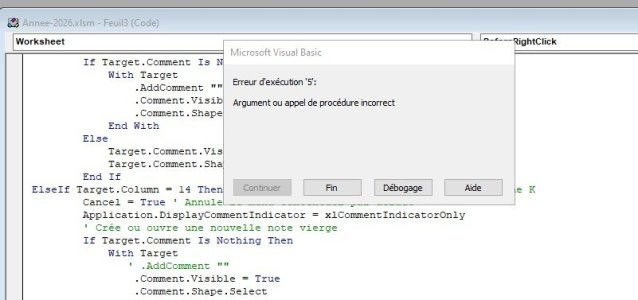
Intéressant sujet mais quand on veut supprimer les commentaires cela plante erreur, (365--w10) il faut sélectionner les colonnes sans commentaires pour effacer ceux que l'on à mis en place mais on ne peut pas en supprimer un seul,
peut on faire une module pour le code et l’appeler depuis le feuille concerner comme sur un calendrier avec 12 mois

bonne continuation jcf
 

Pièces jointes

  • Capture d’écran 2025-12-01 112724.jpg
    Capture d’écran 2025-12-01 112724.jpg
    50 KB · Affichages: 17
Dernière édition:
Bonjour à tous,
un départ:

VB:
Private Sub Worksheet_BeforeRightClick(ByVal Target As Range, Cancel As Boolean)

    ' Ignorer la ligne 1
    If Target.Row = 1 Then Exit Sub

    ' Colonnes B à X = commentaire vide prêt à saisir
    If Target.Column >= 2 And Target.Column <= 24 Then ' B=2 à X=24
        Cancel = True
        Application.DisplayCommentIndicator = xlCommentIndicatorOnly

        If Target.Comment Is Nothing Then
            With Target
                .AddComment ""
                ' Taille du commentaire
                .Comment.Shape.Width = 200
                .Comment.Shape.Height = 150
                .Comment.Visible = True
                .Comment.Shape.Select
            End With
        Else
            Target.Comment.Visible = True
            Target.Comment.Shape.Select
        End If

        Exit Sub
    End If

    ' Colonne J = commentaire vide (ta configuration initiale)
    If Target.Column = 10 Then
        Cancel = True
        Application.DisplayCommentIndicator = xlCommentIndicatorOnly

        If Target.Comment Is Nothing Then
            With Target
                .AddComment ""
                .Comment.Visible = True
                .Comment.Shape.Select
            End With
        Else
            Target.Comment.Visible = True
            Target.Comment.Shape.Select
        End If
        Exit Sub
    End If

End Sub

Private Sub Worksheet_SelectionChange(ByVal Target As Range)
    Application.DisplayCommentIndicator = xlCommentIndicatorOnly
End Sub
Ce n'est pas qu'un début, ça résout ou rempli vraiment l'objectif.

Merci beaucoup
 
Bonjour à vous tous

Intéressant sujet mais quand on veut supprimer un ou des commentaires comment fait-on ...

bonne continuation jcf

Bonjour à tous,

Soit,

1-double clic sur la cellule contenant

ou

2- clique droit sur la cellule contenant le com, le sélectionner et le supprimer

Voici le code complet corriger pour éviter d'avoir l'erreur au clic droit et pouvoir le sélectionner

Code:
Private Sub Worksheet_BeforeRightClick(ByVal Target As Range, Cancel As Boolean)

    On Error GoTo ErrHandler

    If Target.Row = 1 Then Exit Sub
    If Target.CountLarge > 1 Then Exit Sub

    If Target.Column >= 2 And Target.Column <= 24 Then
        Cancel = True
        Application.DisplayCommentIndicator = xlCommentIndicatorOnly

        If Target.Comment Is Nothing Then
            With Target
                .AddComment ""
                On Error Resume Next
                .Comment.Shape.Width = 200
                .Comment.Shape.Height = 150
                On Error GoTo ErrHandler
                .Comment.Visible = True
            End With
        Else

            On Error Resume Next
            Target.Comment.Visible = True
            On Error GoTo ErrHandler
        End If

        Exit Sub
    End If

    If Target.Column = 10 Then
        Cancel = True
        Application.DisplayCommentIndicator = xlCommentIndicatorOnly

        If Target.Comment Is Nothing Then
            With Target
                .AddComment ""
                On Error Resume Next
                .Comment.Shape.Width = 200
                .Comment.Shape.Height = 150
                On Error GoTo ErrHandler
                .Comment.Visible = True
            End With
        Else
            On Error Resume Next
            Target.Comment.Visible = True
            On Error GoTo ErrHandler
        End If

        Exit Sub
    End If

    Exit Sub

ErrHandler:
    Resume Next
End Sub

Private Sub Worksheet_BeforeDoubleClick(ByVal Target As Range, Cancel As Boolean)
    On Error Resume Next
    If Target.CountLarge > 1 Then Exit Sub
    If Not Target.Comment Is Nothing Then
        Target.Comment.Delete
        Cancel = True
    End If
    On Error GoTo 0
End Sub

Private Sub Worksheet_SelectionChange(ByVal Target As Range)
    Application.DisplayCommentIndicator = xlCommentIndicatorOnly
End Sub

Bonne jounée
 

Pièces jointes

Dernière édition:
- Navigue sans publicité
- Accède à Cléa, notre assistante IA experte Excel... et pas que...
- Profite de fonctionnalités exclusives
Ton soutien permet à Excel Downloads de rester 100% gratuit et de continuer à rassembler les passionnés d'Excel.
Je deviens Supporter XLD

Discussions similaires

Retour