anthoYS
XLDnaute Barbatruc
Bonjour
En colonne J ... clic droit.. (voir fichier joint)
Les codes de la feuille :
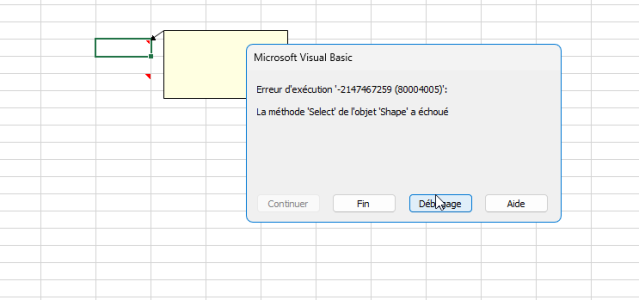
l'erreur en capture :
Merci !
En colonne J ... clic droit.. (voir fichier joint)
Les codes de la feuille :
VB:
Private Sub Worksheet_BeforeDoubleClick(ByVal Target As Range, Cancel As Boolean)
    If Target.Column = 1 And Target.Row > 1 Then
        Cancel = True
        Ligne = Target.Row 'ou Application.Goto [repas].Columns(1).Find(Date)
        UserForm1.Show
    End If
End Sub

Private Sub Worksheet_BeforeRightClick(ByVal Target As Range, Cancel As Boolean)
    If Target.Column = 2 Then ' Vérifie si le clic droit est dans la colonne B
        Cancel = True ' Annule le menu contextuel par défaut
        Application.DisplayCommentIndicator = xlCommentIndicatorOnly
        ' Crée ou ouvre une nouvelle note avec du texte présaisi, espacé, en gras et souligné
        If Target.Comment Is Nothing Then
            With Target
                .AddComment ""
                With .Comment.Shape.TextFrame.Characters
                    .Text = "petit déj : " & vbNewLine & vbNewLine & "déj : " & vbNewLine & vbNewLine & "snack/collation : " & vbNewLine & vbNewLine & "diner : "
                    .Font.Bold = True
                    .Font.Underline = True
                End With
                ' Agrandit la fenêtre du commentaire
                .Comment.Shape.Width = 200 ' Largeur en points
                .Comment.Shape.Height = 150 ' Hauteur en points
                .Comment.Visible = True
                .Comment.Shape.Select
            End With
        Else
            Target.Comment.Visible = True
            Target.Comment.Shape.Select
        End If
    ElseIf Target.Column = 10 Then ' Vérifie si le clic droit est dans la colonne J
        Cancel = True ' Annule le menu contextuel par défaut
        Application.DisplayCommentIndicator = xlCommentIndicatorOnly
        ' Crée ou ouvre une nouvelle note vierge
        If Target.Comment Is Nothing Then
            With Target
                .AddComment ""
                .Comment.Visible = True
                .Comment.Shape.Select
            End With
        Else
            Target.Comment.Visible = True
            Target.Comment.Shape.Select
        End If
    End If
End Sub

Private Sub Worksheet_SelectionChange(ByVal Target As Range)
    Application.DisplayCommentIndicator = xlCommentIndicatorOnly
End Sub
l'erreur en capture :
Merci !