XL 2019 Extraction glyphes arabe

  • Initiateur de la discussion Initiateur de la discussion bazzi
  • Date de début Date de début

Boostez vos compétences Excel avec notre communauté !

Rejoignez Excel Downloads, le rendez-vous des passionnés où l'entraide fait la force. Apprenez, échangez, progressez – et tout ça gratuitement ! 👉 Inscrivez-vous maintenant !

bazzi

XLDnaute Nouveau
bonjour,
y a t-il un moyen dans excel via une macro ou formule permettant d'extraire d'un mot arabe casé dans la cellule "a1" par exemple vers les cellules à sa droite selon la longueur du mot, à condition que le résultat respecte le graphisme des caractères selon leur position dans le mot arabe (isolé,début,mediane et fin).
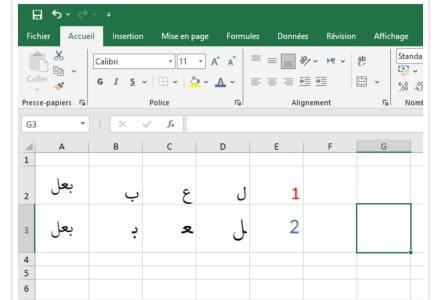
*dans l image ci-joint j ai appliqué une formule d extraction et elle m'a donnée les caractères selon leur forme isolé (voir 1ère ligne)
*dans la seconde ligne j ai forcé excel par l'insertion des symboles a partir du tableau de caractère de la police employée dans l écriture et c'est ce résultat que je veux atteindre.
merci
 

Pièces jointes

  • Screenshot_20260122-215536_Chrome.jpg
    Screenshot_20260122-215536_Chrome.jpg
    56.4 KB · Affichages: 21
Bonjour Bazzi,
Sans fichier test, c'est très difficile de formuler une réponse.
Un fichier test représentatif avec si possible un exemple avec le résultat attendu.
Merci sylvanau d'avoir répondu à ma question,pour le résultat attendu c
Bonjour Bazzi,
Sans fichier test, c'est très difficile de formuler une réponse.
Un fichier test représentatif avec si possible un exemple avec le résultat attendu.
Merci sylvanu,
Concernant le résultat attendu c'est ce qui figure dans la ligne 3 (cas 2 en bleu)
Je m explique l écriture arabe se compose de quatre formes et positions pour certains de ces lettres à savoir (isolé, début, mediane et fin) j'attends à ce que une extraction caractère par caractère d'un mot arabe donné me retourne le graphisme exact de la lettre selon sa position dans le mot,et la ligne 3 est la bonne illustration contrairement à la ligne 2 qui me donne le graphisme seulement des cas isolés de ces lettr.cordialement.
 
Regarde dans l'exemple suivant, en grande partie grâce Gemeni:
Pour tester lance la macro ExtraireEtAfficherGlyphes
Code:
Option Explicit
Private Declare PtrSafe Function CreateFontW Lib "gdi32" (ByVal nHeight As Long, ByVal nWidth As Long, ByVal nEscapement As Long, ByVal nOrientation As Long, ByVal fnWeight As Long, ByVal fdwItalic As Long, ByVal fdwUnderline As Long, ByVal fdwStrikeOut As Long, ByVal fdwCharSet As Long, ByVal fdwOutputPrecision As Long, ByVal fdwClipPrecision As Long, ByVal fdwQuality As Long, ByVal fdwPitchAndFamily As Long, ByVal lpszFace As LongPtr) As LongPtr
    Private Declare PtrSafe Function SelectObject Lib "gdi32" (ByVal hdc As LongPtr, ByVal hObject As LongPtr) As LongPtr
    Private Declare PtrSafe Function DeleteObject Lib "gdi32" (ByVal hObject As LongPtr) As Long
Private Declare PtrSafe Function GetGlyphIndicesW Lib "gdi32" ( _
        ByVal hdc As LongPtr, _
        ByVal lpstr As LongPtr, _
        ByVal c As Long, _
        ByRef pgi As Any, _
        ByVal fl As Long) As Long
    ' Récupérer le contexte de périphérique
Private Declare PtrSafe Function GetDC Lib "user32" (ByVal hwnd As LongPtr) As LongPtr
' Relâcher le contexte de périphérique (CRUCIAL)
Private Declare PtrSafe Function ReleaseDC Lib "user32" (ByVal hwnd As LongPtr, ByVal hdc As LongPtr) As Long
' L'API principale pour les glyphes
Private Declare PtrSafe Function GetCharacterPlacementW Lib "gdi32" ( _
    ByVal hdc As LongPtr, _
    ByVal lpString As LongPtr, _
    ByVal nCount As Long, _
    ByVal nMaxExtent As Long, _
    ByRef lpResults As GCP_RESULTS, _
    ByVal dwFlags As Long) As Long

Private Type GCP_RESULTS
    lStructSize As Long
    lpOutString As LongPtr
    lpOrder As LongPtr
    lpDx As LongPtr
    lpCaretPos As LongPtr
    lpClass As LongPtr
    lpGlyphs As LongPtr     ' Pointeur vers le tableau d'indices
    nGlyphs As Long
    nMaxFit As Long
End Type
Private Const GGI_MARK_NONEXISTING_GLYPHS As Long = &H1
Private Const FW_NORMAL As Long = 400
Private Const DEFAULT_CHARSET As Long = 1
 
Dim GlyphToUnicode As Object ' On utilise un Dictionary pour le mapping

Sub BuildArabicMapping(hdc As LongPtr)
    Set GlyphToUnicode = CreateObject("Scripting.Dictionary")
    
    Dim i As Long
    Dim glyphIdx As Integer
    Dim char As String
    
    ' Plages Arabes principales :
    ' 0600-06FF (Arabe standard)
    ' FE70-FEFF (Formes de présentation A & B)
    Dim plages As Variant
    plages = Array(Array(&H600&, &H6FF&), Array(&HFE70&, &HFEFF&))
    
    Dim p As Integer
    For p = LBound(plages) To UBound(plages)
        For i = plages(p)(0) To plages(p)(1)
            char = (i)
            glyphIdx = 0
            ' Récupérer l'index du glyph pour ce code point
            If GetGlyphIndicesW(hdc, VarPtr(i), 1, glyphIdx, GGI_MARK_NONEXISTING_GLYPHS) <> 0 Then
                ' On stocke : GlyphID -> Unicode
                If Not GlyphToUnicode.Exists(glyphIdx) Then
                    If i > &H7FFF& Then
                      GlyphToUnicode.Add glyphIdx, CInt(i - &H10000)
                    Else
                      GlyphToUnicode.Add glyphIdx, i
                    End If
                End If
            End If
        Next i
    Next p
End Sub
' --- CODE PRINCIPAL ---

Sub ExtraireEtAfficherGlyphes()
    Dim hdc As LongPtr
    Dim texte As String
    Dim i As Integer
    Dim indices() As Integer
    Dim Order() As Long
    Dim hFont As LongPtr, old As LongPtr
    texte = Range("A1") ' Texte à analyser
    hFont = CreateFontW(-16, 0, 0, 0, FW_NORMAL, 0, 0, 0, DEFAULT_CHARSET, 0, 0, 0, 0, StrPtr("Tahoma"))
    ' 1. Obtenir le HDC de l'écran (0)
    hdc = GetDC(0)
    old = SelectObject(hdc, hFont)
    If GlyphToUnicode Is Nothing Then
       BuildArabicMapping hdc
    End If
    On Error GoTo CleanUp
    ' 2. Préparer le tableau de réception (Buffer)
    ' Le nombre de glyphes peut être égal ou supérieur au nombre de caractères
    ReDim indices(Len(texte) - 1)
    ReDim Order(Len(texte) - 1)
    ' 3. Configurer la structure GCP_RESULTS
    Dim gcp As GCP_RESULTS
    gcp.lStructSize = Len(gcp)
    gcp.lpGlyphs = VarPtr(indices(0)) ' On donne l'adresse mémoire du tableau
    gcp.nGlyphs = Len(texte)
    gcp.lpOrder = VarPtr(Order(0))
    ' 4. Appeler l'API
    ' On utilise StrPtr pour passer la chaîne en Unicode (UTF-16)
    If GetCharacterPlacementW(hdc, StrPtr(texte), Len(texte), 0, gcp, 2) <> 0 Then
       Dim last As Long, curr As Long
       last = -1
       ReDim ou(0 To UBound(indices))
       For i = 0 To gcp.nMaxFit - 1
           curr = Order(i)
           If curr <> last Then
              Range("B1").Offset(0, i) = ChrW(GlyphToUnicode(indices(i)))
              last = curr
           End If
        Next i
    End If

CleanUp:
    ' 5. Libérer impérativement le HDC
    If hdc <> 0 Then
       SelectObject hdc, old
       DeleteObject hFont
       ReleaseDC 0, hdc
    End If
End Sub
 
Regarde dans l'exemple suivant, en grande partie grâce Gemeni:
Pour tester lance la macro ExtraireEtAfficherGlyphes
Code:
Option Explicit
Private Declare PtrSafe Function CreateFontW Lib "gdi32" (ByVal nHeight As Long, ByVal nWidth As Long, ByVal nEscapement As Long, ByVal nOrientation As Long, ByVal fnWeight As Long, ByVal fdwItalic As Long, ByVal fdwUnderline As Long, ByVal fdwStrikeOut As Long, ByVal fdwCharSet As Long, ByVal fdwOutputPrecision As Long, ByVal fdwClipPrecision As Long, ByVal fdwQuality As Long, ByVal fdwPitchAndFamily As Long, ByVal lpszFace As LongPtr) As LongPtr
    Private Declare PtrSafe Function SelectObject Lib "gdi32" (ByVal hdc As LongPtr, ByVal hObject As LongPtr) As LongPtr
    Private Declare PtrSafe Function DeleteObject Lib "gdi32" (ByVal hObject As LongPtr) As Long
Private Declare PtrSafe Function GetGlyphIndicesW Lib "gdi32" ( _
        ByVal hdc As LongPtr, _
        ByVal lpstr As LongPtr, _
        ByVal c As Long, _
        ByRef pgi As Any, _
        ByVal fl As Long) As Long
    ' Récupérer le contexte de périphérique
Private Declare PtrSafe Function GetDC Lib "user32" (ByVal hwnd As LongPtr) As LongPtr
' Relâcher le contexte de périphérique (CRUCIAL)
Private Declare PtrSafe Function ReleaseDC Lib "user32" (ByVal hwnd As LongPtr, ByVal hdc As LongPtr) As Long
' L'API principale pour les glyphes
Private Declare PtrSafe Function GetCharacterPlacementW Lib "gdi32" ( _
    ByVal hdc As LongPtr, _
    ByVal lpString As LongPtr, _
    ByVal nCount As Long, _
    ByVal nMaxExtent As Long, _
    ByRef lpResults As GCP_RESULTS, _
    ByVal dwFlags As Long) As Long

Private Type GCP_RESULTS
    lStructSize As Long
    lpOutString As LongPtr
    lpOrder As LongPtr
    lpDx As LongPtr
    lpCaretPos As LongPtr
    lpClass As LongPtr
    lpGlyphs As LongPtr     ' Pointeur vers le tableau d'indices
    nGlyphs As Long
    nMaxFit As Long
End Type
Private Const GGI_MARK_NONEXISTING_GLYPHS As Long = &H1
Private Const FW_NORMAL As Long = 400
Private Const DEFAULT_CHARSET As Long = 1
 
Dim GlyphToUnicode As Object ' On utilise un Dictionary pour le mapping

Sub BuildArabicMapping(hdc As LongPtr)
    Set GlyphToUnicode = CreateObject("Scripting.Dictionary")
    
    Dim i As Long
    Dim glyphIdx As Integer
    Dim char As String
    
    ' Plages Arabes principales :
    ' 0600-06FF (Arabe standard)
    ' FE70-FEFF (Formes de présentation A & B)
    Dim plages As Variant
    plages = Array(Array(&H600&, &H6FF&), Array(&HFE70&, &HFEFF&))
    
    Dim p As Integer
    For p = LBound(plages) To UBound(plages)
        For i = plages(p)(0) To plages(p)(1)
            char = (i)
            glyphIdx = 0
            ' Récupérer l'index du glyph pour ce code point
            If GetGlyphIndicesW(hdc, VarPtr(i), 1, glyphIdx, GGI_MARK_NONEXISTING_GLYPHS) <> 0 Then
                ' On stocke : GlyphID -> Unicode
                If Not GlyphToUnicode.Exists(glyphIdx) Then
                    If i > &H7FFF& Then
                      GlyphToUnicode.Add glyphIdx, CInt(i - &H10000)
                    Else
                      GlyphToUnicode.Add glyphIdx, i
                    End If
                End If
            End If
        Next i
    Next p
End Sub
' --- CODE PRINCIPAL ---

Sub ExtraireEtAfficherGlyphes()
    Dim hdc As LongPtr
    Dim texte As String
    Dim i As Integer
    Dim indices() As Integer
    Dim Order() As Long
    Dim hFont As LongPtr, old As LongPtr
    texte = Range("A1") ' Texte à analyser
    hFont = CreateFontW(-16, 0, 0, 0, FW_NORMAL, 0, 0, 0, DEFAULT_CHARSET, 0, 0, 0, 0, StrPtr("Tahoma"))
    ' 1. Obtenir le HDC de l'écran (0)
    hdc = GetDC(0)
    old = SelectObject(hdc, hFont)
    If GlyphToUnicode Is Nothing Then
       BuildArabicMapping hdc
    End If
    On Error GoTo CleanUp
    ' 2. Préparer le tableau de réception (Buffer)
    ' Le nombre de glyphes peut être égal ou supérieur au nombre de caractères
    ReDim indices(Len(texte) - 1)
    ReDim Order(Len(texte) - 1)
    ' 3. Configurer la structure GCP_RESULTS
    Dim gcp As GCP_RESULTS
    gcp.lStructSize = Len(gcp)
    gcp.lpGlyphs = VarPtr(indices(0)) ' On donne l'adresse mémoire du tableau
    gcp.nGlyphs = Len(texte)
    gcp.lpOrder = VarPtr(Order(0))
    ' 4. Appeler l'API
    ' On utilise StrPtr pour passer la chaîne en Unicode (UTF-16)
    If GetCharacterPlacementW(hdc, StrPtr(texte), Len(texte), 0, gcp, 2) <> 0 Then
       Dim last As Long, curr As Long
       last = -1
       ReDim ou(0 To UBound(indices))
       For i = 0 To gcp.nMaxFit - 1
           curr = Order(i)
           If curr <> last Then
              Range("B1").Offset(0, i) = ChrW(GlyphToUnicode(indices(i)))
              last = curr
           End If
        Next i
    End If

CleanUp:
    ' 5. Libérer impérativement le HDC
    If hdc <> 0 Then
       SelectObject hdc, old
       DeleteObject hFont
       ReleaseDC 0, hdc
    End If
End Sub
 
Voila comment appliquer le code sur la colonne A, pour lancer l'opération appeler ExtraireList
Dans ce genre d'opération qui touche le traitement interne du texte il faut s'attendre que certains caractères ne s'affichent pas correctement car GetCharacterPlacement ne fait pas de substitution automatique en cas d'absence d'un glyph.
Code:
Option Explicit
Private Declare PtrSafe Function CreateFontW Lib "gdi32" (ByVal nHeight As Long, ByVal nWidth As Long, ByVal nEscapement As Long, ByVal nOrientation As Long, ByVal fnWeight As Long, ByVal fdwItalic As Long, ByVal fdwUnderline As Long, ByVal fdwStrikeOut As Long, ByVal fdwCharSet As Long, ByVal fdwOutputPrecision As Long, ByVal fdwClipPrecision As Long, ByVal fdwQuality As Long, ByVal fdwPitchAndFamily As Long, ByVal lpszFace As LongPtr) As LongPtr
    Private Declare PtrSafe Function SelectObject Lib "gdi32" (ByVal hdc As LongPtr, ByVal hObject As LongPtr) As LongPtr
    Private Declare PtrSafe Function DeleteObject Lib "gdi32" (ByVal hObject As LongPtr) As Long
Private Declare PtrSafe Function GetGlyphIndicesW Lib "gdi32" ( _
        ByVal hdc As LongPtr, _
        ByVal lpstr As LongPtr, _
        ByVal c As Long, _
        ByRef pgi As Any, _
        ByVal fl As Long) As Long
    ' Récupérer le contexte de périphérique
Private Declare PtrSafe Function GetDC Lib "user32" (ByVal hwnd As LongPtr) As LongPtr
' Relâcher le contexte de périphérique (CRUCIAL)
Private Declare PtrSafe Function ReleaseDC Lib "user32" (ByVal hwnd As LongPtr, ByVal hdc As LongPtr) As Long
' L'API principale pour les glyphes
Private Declare PtrSafe Function GetCharacterPlacementW Lib "gdi32" ( _
    ByVal hdc As LongPtr, _
    ByVal lpString As LongPtr, _
    ByVal nCount As Long, _
    ByVal nMaxExtent As Long, _
    ByRef lpResults As GCP_RESULTS, _
    ByVal dwFlags As Long) As Long

Private Type GCP_RESULTS
    lStructSize As Long
    lpOutString As LongPtr
    lpOrder As LongPtr
    lpDx As LongPtr
    lpCaretPos As LongPtr
    lpClass As LongPtr
    lpGlyphs As LongPtr     ' Pointeur vers le tableau d'indices
    nGlyphs As Long
    nMaxFit As Long
End Type
Private Const GGI_MARK_NONEXISTING_GLYPHS As Long = &H1
Private Const FW_NORMAL As Long = 400
Private Const DEFAULT_CHARSET As Long = 1
 
Dim GlyphToUnicode As Object ' On utilise un Dictionary pour le mapping

Sub BuildArabicMapping(hdc As LongPtr)
    Set GlyphToUnicode = CreateObject("Scripting.Dictionary")
    
    Dim i As Long
    Dim glyphIdx As Integer
    Dim char As String
    
    ' Plages Arabes principales :
    ' 0600-06FF (Arabe standard)
    ' FE70-FEFF (Formes de présentation A & B)
    Dim plages As Variant
    plages = Array(Array(&H600&, &H6FF&), Array(&HFE70&, &HFEFF&))
    
    Dim p As Integer
    For p = LBound(plages) To UBound(plages)
        For i = plages(p)(0) To plages(p)(1)
            char = (i)
            glyphIdx = 0
            ' Récupérer l'index du glyph pour ce code point
            If GetGlyphIndicesW(hdc, VarPtr(i), 1, glyphIdx, GGI_MARK_NONEXISTING_GLYPHS) <> 0 Then
                ' On stocke : GlyphID -> Unicode
                If Not GlyphToUnicode.Exists(glyphIdx) Then
                    If i > &H7FFF& Then
                      GlyphToUnicode.Add glyphIdx, CInt(i - &H10000)
                    Else
                      GlyphToUnicode.Add glyphIdx, i
                    End If
                End If
            End If
        Next i
    Next p
End Sub
' --- CODE PRINCIPAL ---

Private Function ExtraireGlyphes(ByVal Rng As Range)
    Dim hdc As LongPtr
    Dim texte As String
    Dim i As Integer
    Dim indices() As Integer
    Dim Order() As Long
    Dim hFont As LongPtr, old As LongPtr, j As Long
    Dim ret() As String, txt As String
    
    hFont = CreateFontW(-16, 0, 0, 0, FW_NORMAL, 0, 0, 0, DEFAULT_CHARSET, 0, 0, 0, 0, StrPtr("Tahoma"))
    ' 1. Obtenir le HDC de l'écran (0)
    hdc = GetDC(0)
    old = SelectObject(hdc, hFont)
    If GlyphToUnicode Is Nothing Then
       BuildArabicMapping hdc
    End If
    Dim gcp As GCP_RESULTS
     
    ReDim ret(1 To Rng.Rows.Count)
    On Error Resume Next
    For j = 1 To Rng.Rows.Count
      texte = Rng.Cells(j, 1).Value
      If Len(texte) = 0 Then GoTo nSkip
      ReDim indices(Len(texte) - 1)
      ReDim Order(Len(texte) - 1)
      ' 3. Configurer la structure GCP_RESULTS
      gcp.lStructSize = Len(gcp)
      gcp.lpGlyphs = VarPtr(indices(0)) ' On donne l'adresse mémoire du tableau
      gcp.nGlyphs = Len(texte)
      gcp.lpOrder = VarPtr(Order(0))
      gcp.nMaxFit = 0
      ' 4. Appeler l'API
      ' On utilise StrPtr pour passer la chaîne en Unicode (UTF-16)
      If GetCharacterPlacementW(hdc, StrPtr(texte), Len(texte), 0, gcp, 2) <> 0 Then
         Dim last As Long, curr As Long, idx As Long
         last = -1
         idx = 0
         txt = ""
         For i = 0 To gcp.nMaxFit - 1
             curr = Order(i)
             If curr <> last Then
               ' Range("B1").Offset(0, idx) = ChrW(GlyphToUnicode(indices(idx)))
                txt = txt & ChrW(GlyphToUnicode(indices(idx)))
                last = curr
                idx = idx + 1
             End If
          Next i
          ret(j) = txt
      End If
nSkip:
    Next
 ' 5. Libérer impérativement le HDC
If hdc <> 0 Then
   SelectObject hdc, old
   DeleteObject hFont
   ReleaseDC 0, hdc
End If
ExtraireGlyphes = ret
End Function

Sub ExtraireList()
Dim List, Result, lastrow As Long, Sortie As Range
Dim i As Long, j As Long, txt As String
Application.ScreenUpdating = False
lastrow = Range("A1000").End(xlUp).Row
Set List = Range("A1:A" & lastrow)
 Result = ExtraireGlyphes(List)
 Set Sortie = List.Cells(1).Offset(0, 1) ' colonne adjacente
 For i = LBound(Result) To UBound(Result)
    txt = Result(i)
    Sortie.Cells(i, 1).Resize(1, 15).Value = ""
    For j = 1 To Len(txt)
       Sortie.Cells(i, j) = Mid(txt, j, 1)
    Next
 Next
Application.ScreenUpdating = True
End Sub

 
Voila comment appliquer le code sur la colonne A, pour lancer l'opération appeler ExtraireList
Dans ce genre d'opération qui touche le traitement interne du texte il faut s'attendre que certains caractères ne s'affichent pas correctement car GetCharacterPlacement ne fait pas de substitution automatique en cas d'absence d'un glyph.
Code:
Option Explicit
Private Declare PtrSafe Function CreateFontW Lib "gdi32" (ByVal nHeight As Long, ByVal nWidth As Long, ByVal nEscapement As Long, ByVal nOrientation As Long, ByVal fnWeight As Long, ByVal fdwItalic As Long, ByVal fdwUnderline As Long, ByVal fdwStrikeOut As Long, ByVal fdwCharSet As Long, ByVal fdwOutputPrecision As Long, ByVal fdwClipPrecision As Long, ByVal fdwQuality As Long, ByVal fdwPitchAndFamily As Long, ByVal lpszFace As LongPtr) As LongPtr
    Private Declare PtrSafe Function SelectObject Lib "gdi32" (ByVal hdc As LongPtr, ByVal hObject As LongPtr) As LongPtr
    Private Declare PtrSafe Function DeleteObject Lib "gdi32" (ByVal hObject As LongPtr) As Long
Private Declare PtrSafe Function GetGlyphIndicesW Lib "gdi32" ( _
        ByVal hdc As LongPtr, _
        ByVal lpstr As LongPtr, _
        ByVal c As Long, _
        ByRef pgi As Any, _
        ByVal fl As Long) As Long
    ' Récupérer le contexte de périphérique
Private Declare PtrSafe Function GetDC Lib "user32" (ByVal hwnd As LongPtr) As LongPtr
' Relâcher le contexte de périphérique (CRUCIAL)
Private Declare PtrSafe Function ReleaseDC Lib "user32" (ByVal hwnd As LongPtr, ByVal hdc As LongPtr) As Long
' L'API principale pour les glyphes
Private Declare PtrSafe Function GetCharacterPlacementW Lib "gdi32" ( _
    ByVal hdc As LongPtr, _
    ByVal lpString As LongPtr, _
    ByVal nCount As Long, _
    ByVal nMaxExtent As Long, _
    ByRef lpResults As GCP_RESULTS, _
    ByVal dwFlags As Long) As Long

Private Type GCP_RESULTS
    lStructSize As Long
    lpOutString As LongPtr
    lpOrder As LongPtr
    lpDx As LongPtr
    lpCaretPos As LongPtr
    lpClass As LongPtr
    lpGlyphs As LongPtr     ' Pointeur vers le tableau d'indices
    nGlyphs As Long
    nMaxFit As Long
End Type
Private Const GGI_MARK_NONEXISTING_GLYPHS As Long = &H1
Private Const FW_NORMAL As Long = 400
Private Const DEFAULT_CHARSET As Long = 1
 
Dim GlyphToUnicode As Object ' On utilise un Dictionary pour le mapping

Sub BuildArabicMapping(hdc As LongPtr)
    Set GlyphToUnicode = CreateObject("Scripting.Dictionary")
   
    Dim i As Long
    Dim glyphIdx As Integer
    Dim char As String
   
    ' Plages Arabes principales :
    ' 0600-06FF (Arabe standard)
    ' FE70-FEFF (Formes de présentation A & B)
    Dim plages As Variant
    plages = Array(Array(&H600&, &H6FF&), Array(&HFE70&, &HFEFF&))
   
    Dim p As Integer
    For p = LBound(plages) To UBound(plages)
        For i = plages(p)(0) To plages(p)(1)
            char = (i)
            glyphIdx = 0
            ' Récupérer l'index du glyph pour ce code point
            If GetGlyphIndicesW(hdc, VarPtr(i), 1, glyphIdx, GGI_MARK_NONEXISTING_GLYPHS) <> 0 Then
                ' On stocke : GlyphID -> Unicode
                If Not GlyphToUnicode.Exists(glyphIdx) Then
                    If i > &H7FFF& Then
                      GlyphToUnicode.Add glyphIdx, CInt(i - &H10000)
                    Else
                      GlyphToUnicode.Add glyphIdx, i
                    End If
                End If
            End If
        Next i
    Next p
End Sub
' --- CODE PRINCIPAL ---

Private Function ExtraireGlyphes(ByVal Rng As Range)
    Dim hdc As LongPtr
    Dim texte As String
    Dim i As Integer
    Dim indices() As Integer
    Dim Order() As Long
    Dim hFont As LongPtr, old As LongPtr, j As Long
    Dim ret() As String, txt As String
   
    hFont = CreateFontW(-16, 0, 0, 0, FW_NORMAL, 0, 0, 0, DEFAULT_CHARSET, 0, 0, 0, 0, StrPtr("Tahoma"))
    ' 1. Obtenir le HDC de l'écran (0)
    hdc = GetDC(0)
    old = SelectObject(hdc, hFont)
    If GlyphToUnicode Is Nothing Then
       BuildArabicMapping hdc
    End If
    Dim gcp As GCP_RESULTS
    
    ReDim ret(1 To Rng.Rows.Count)
    On Error Resume Next
    For j = 1 To Rng.Rows.Count
      texte = Rng.Cells(j, 1).Value
      If Len(texte) = 0 Then GoTo nSkip
      ReDim indices(Len(texte) - 1)
      ReDim Order(Len(texte) - 1)
      ' 3. Configurer la structure GCP_RESULTS
      gcp.lStructSize = Len(gcp)
      gcp.lpGlyphs = VarPtr(indices(0)) ' On donne l'adresse mémoire du tableau
      gcp.nGlyphs = Len(texte)
      gcp.lpOrder = VarPtr(Order(0))
      gcp.nMaxFit = 0
      ' 4. Appeler l'API
      ' On utilise StrPtr pour passer la chaîne en Unicode (UTF-16)
      If GetCharacterPlacementW(hdc, StrPtr(texte), Len(texte), 0, gcp, 2) <> 0 Then
         Dim last As Long, curr As Long, idx As Long
         last = -1
         idx = 0
         txt = ""
         For i = 0 To gcp.nMaxFit - 1
             curr = Order(i)
             If curr <> last Then
               ' Range("B1").Offset(0, idx) = ChrW(GlyphToUnicode(indices(idx)))
                txt = txt & ChrW(GlyphToUnicode(indices(idx)))
                last = curr
                idx = idx + 1
             End If
          Next i
          ret(j) = txt
      End If
nSkip:
    Next
 ' 5. Libérer impérativement le HDC
If hdc <> 0 Then
   SelectObject hdc, old
   DeleteObject hFont
   ReleaseDC 0, hdc
End If
ExtraireGlyphes = ret
End Function

Sub ExtraireList()
Dim List, Result, lastrow As Long, Sortie As Range
Dim i As Long, j As Long, txt As String
Application.ScreenUpdating = False
lastrow = Range("A1000").End(xlUp).Row
Set List = Range("A1:A" & lastrow)
 Result = ExtraireGlyphes(List)
 Set Sortie = List.Cells(1).Offset(0, 1) ' colonne adjacente
 For i = LBound(Result) To UBound(Result)
    txt = Result(i)
    Sortie.Cells(i, 1).Resize(1, 15).Value = ""
    For j = 1 To Len(txt)
       Sortie.Cells(i, j) = Mid(txt, j, 1)
    Next
 Next
Application.ScreenUpdating = True
End Sub
merci infiniment Rheeem ça marche parfaitement.
 
- Navigue sans publicité
- Accède à Cléa, notre assistante IA experte Excel... et pas que...
- Profite de fonctionnalités exclusives
Ton soutien permet à Excel Downloads de rester 100% gratuit et de continuer à rassembler les passionnés d'Excel.
Je deviens Supporter XLD

Discussions similaires

Réponses
1
Affichages
2 K
Retour