Microsoft 365 Switcher entre 3 couleurs et 3 textes

  • Initiateur de la discussion Initiateur de la discussion pat66
  • Date de début Date de début

Boostez vos compétences Excel avec notre communauté !

Rejoignez Excel Downloads, le rendez-vous des passionnés où l'entraide fait la force. Apprenez, échangez, progressez – et tout ça gratuitement ! 👉 Inscrivez-vous maintenant !

pat66

XLDnaute Impliqué
Bonjour le forum,,

J'ai besoin de vos lumières car actuellement j'utilise cette macro qui fonctionne très bien, mais je souhaite avoir la possibilité de switcher avec 3 valeurs au lieu de 2
soit au lieu de switcher entre LMNP et LLI, pouvoir le faire entre LMNP, LLI et LLI vide et bien sur avoir 3 couleurs différentes, j'ai pensé à select case, mais je ne sais le rédiger, en tout cas merci pour aide.

Sub LLI()
With ActiveSheet.DrawingObjects("Rectangle : coins arrondis 1")
.Characters.Text = Array("LMNP", " LLI")(Abs(.Characters.Text = "LMNP"))
.Interior.Color = Array(RGB(0, 158, 71), RGB(217, 217, 217))(Abs(.Characters.Text = "LMNP"))
.Font.Color = Array(RGB(217, 217, 217), RGB(22, 54, 92))(Abs(.Characters.Text = "LMNP"))
End With
End Sub

cdt
 
Solution
Comme ça, ça a l'air d'aller :
VB:
Sub LLI()
   Dim Obj As Object, N As Integer
   Set Obj = ActiveSheet.DrawingObjects(Application.Caller)
   On Error Resume Next
   N = WorksheetFunction.Match(Obj.Characters.Text, Array("LLI vide", "LMNP", "LLI"), 0)
   If Err Then N = 1
   On Error GoTo 0
   Obj.Characters.Text = Choose(N, "LMNP", "LLI", "LLI vide")
   Obj.Interior.Color = Choose(N, RGB(0, 158, 71), RGB(217, 217, 217), RGB(186, 186, 186))
   Obj.Font.Color = Choose(N, RGB(217, 217, 217), RGB(22, 54, 92), RGB(150, 150, 150))
   End Sub
Bonjour.
Essayez comme ça :
VB:
Sub LLI()
   Dim N As Integer
   With ActiveSheet.DrawingObjects("Rectangle : coins arrondis 1")
      N = WorksheetFunction.Match(.Characters.Text, Array("LLI vide", "LMNP", "LLI"), 0)
      .Characters.Text = Choose(N, "LMNP", "LLI", "LLI vide")
      .Interior.Color = Choose(N, RGB(0, 158, 71), RGB(217, 217, 217), RGB(186, 186, 186))
      .Font.Color = Choose(N, RGB(217, 217, 217), RGB(22, 54, 92), RGB(150, 150, 150))
      End With
   End Sub
 
Bonjour,

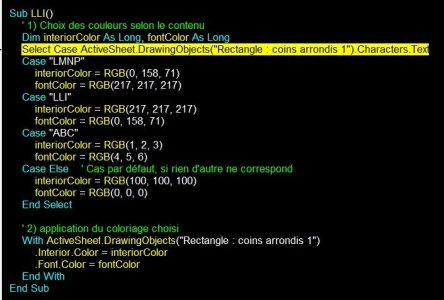
Basé sur ma compréhension de votre code assez original, voici une proposition découpée en 2 parties pour bien comprendre :
VB:
Sub LLI()
    ' 1) Choix des couleurs selon le contenu
    dim interiorColor As Long, fontColor As Long
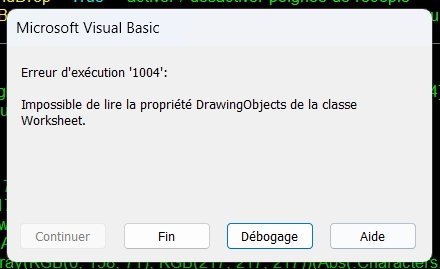
    Select Case ActiveSheet.DrawingObjects("Rectangle : coins arrondis 1").Characters.Text
    Case "LMNP"
        interiorColor = RGB(0, 158, 71)
        fontColor = RGB(217, 217, 217)
    Case "LLI"
        interiorColor = RGB(217, 217, 217)
        fontColor = RGB(0, 158, 71)
    Case "ABC"
        interiorColor = RGB(1, 2, 3)
        fontColor = RGB(4, 5, 6)
    Case Else    ' Cas par défaut, si rien d'autre ne correspond
        interiorColor = RGB(100, 100, 100)
        fontColor = RGB(0, 0, 0)
    End Select
   
    ' 2) application du coloriage choisi
    With ActiveSheet.DrawingObjects("Rectangle : coins arrondis 1")
        .Interior.Color = interiorColor
        .Font.Color = fontColor
    End With
End Sub
 
Comme ça, ça a l'air d'aller :
VB:
Sub LLI()
   Dim Obj As Object, N As Integer
   Set Obj = ActiveSheet.DrawingObjects(Application.Caller)
   On Error Resume Next
   N = WorksheetFunction.Match(Obj.Characters.Text, Array("LLI vide", "LMNP", "LLI"), 0)
   If Err Then N = 1
   On Error GoTo 0
   Obj.Characters.Text = Choose(N, "LMNP", "LLI", "LLI vide")
   Obj.Interior.Color = Choose(N, RGB(0, 158, 71), RGB(217, 217, 217), RGB(186, 186, 186))
   Obj.Font.Color = Choose(N, RGB(217, 217, 217), RGB(22, 54, 92), RGB(150, 150, 150))
   End Sub
 
Bonjour @Dranreb

sans la gestion d'erreur avec l'astuce MOD

VB:
Sub LLI()
    Dim s As Object
    Dim i As Integer
    Set s = ActiveSheet.DrawingObjects("Rectangle : coins arrondis 1")
    If s.Characters.Text = "LMNP" Then
        i = 0
    ElseIf s.Characters.Text = "LLI" Then
        i = 1
    Else
        i = 2  ' C'est l'état "Vide" (ou LLI vide)
    End If
    i = (i + 1) Mod 3
    With s
        .Characters.Text = Array("LMNP", "LLI", "LLI vide")(i)
        .Interior.Color = Array(RGB(0, 158, 71), RGB(217, 217, 217), RGB(255, 255, 255))(i)
        .Font.Color = Array(RGB(217, 217, 217), RGB(22, 54, 92), RGB(0, 0, 0))(i)
        .Parent.Range("D90").Value = Array(10, 0, 0)(i)
    End With
End Sub
 
Dernière édition:
- Navigue sans publicité
- Accède à Cléa, notre assistante IA experte Excel... et pas que...
- Profite de fonctionnalités exclusives
Ton soutien permet à Excel Downloads de rester 100% gratuit et de continuer à rassembler les passionnés d'Excel.
Je deviens Supporter XLD
Retour